Most AI builders fail because they start with prompts. I start with a README.

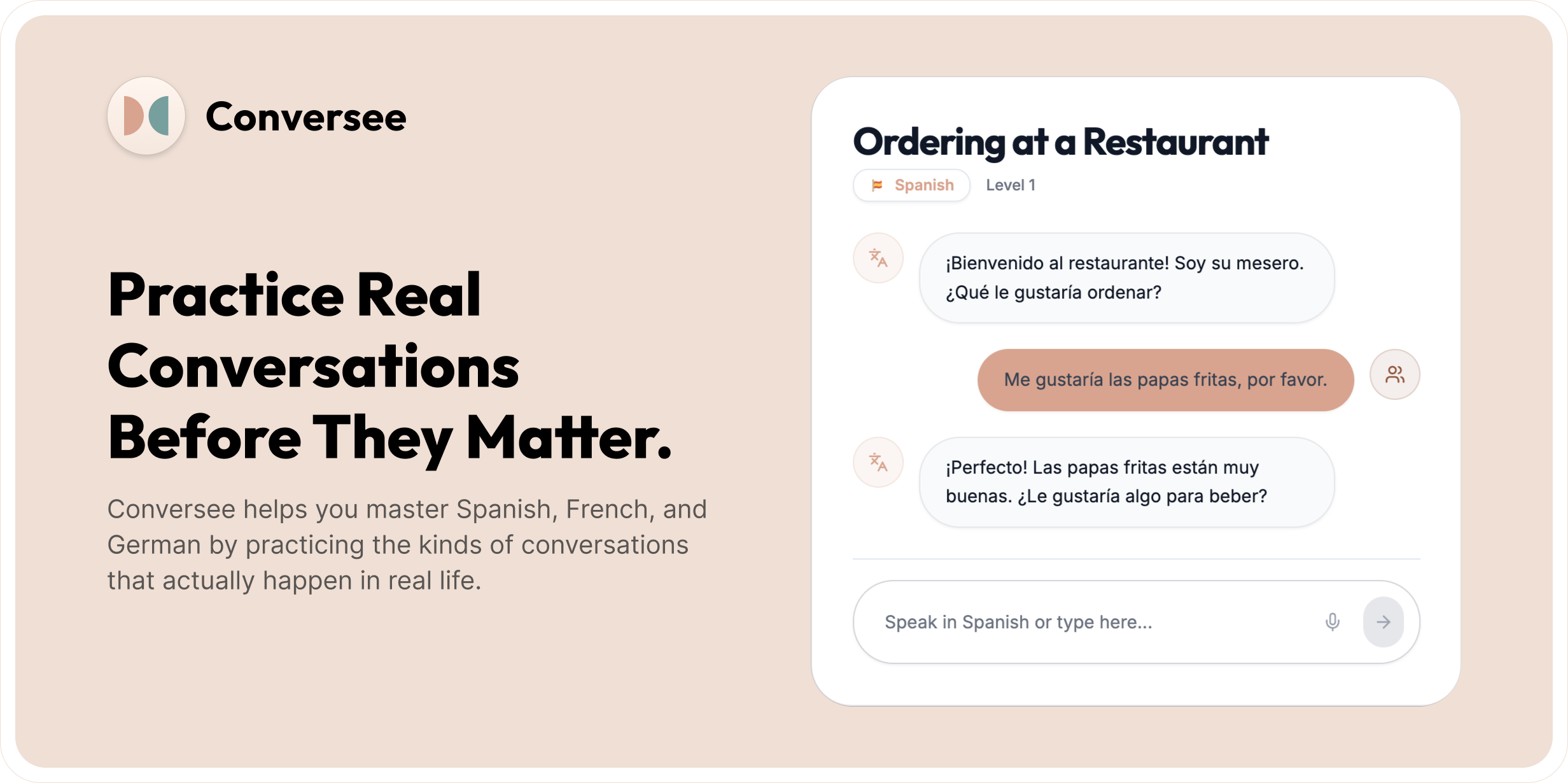
Four weeks ago, I built a language learning app. A working product with conversational voice AI and progress tracking. The reason it worked? I spent an hour storyboarding and planning before I wrote a single prompt.
Why Your AI Projects Die in Week Two
You: "Build a recipe app for parents"
AI: builds something
You: "Add user accounts"
AI: breaks everything
Sound familiar?
You're giving directions one turn at a time instead of showing the destination. The AI makes technically correct decisions that destroy your architecture because it doesn't know where you're going.
I learned this the hard way. My early attempts with Cursor, Bolt.new, and Lovable produced cool prototypes that collapsed when I tried to add more functionality.
Then I read Peter Yang's article about vibe coding a star wars game with PRDs. It clicked with me. Just like when you are working with a team, you don’t just jump right into the end solution… You map it out and ideate together. I didn’t just need better prompts, I needed to provide context!
The fix: Storyboard your flow and write the ending.
The README Method in Action
Before touching any AI coding tool, I sketch out the user journey. Just a quick flowchart showing how someone moves through this product or feature. I answer what the problem is, who it’s for, why do they need it, what’s the business context and audience.
For Conversee (my language learning app), it looked like this:
Select a language to learn → Pick a goal for why you're learning (travel coming up etc) → Scenario Picker (ordering at a restaurant) → Conversation practice for that scenario → Session Summary → Track progress and continue learningThen I take that context and write a README:
Problem: I've used Duolingo and learned a decent vocabulary but I freeze up still when I try to order food in Dusseldorf. I forgot the words in the moment.
User: Sarah, heading to Barcelona next month, hoping all the cramming she’s done will work but worried she’ll default to English.
Model: Free plan with 10 conversations/week. Paid tier if they want more.
Why this: Let me practice conversations without pressure or scheduling a tutor.
Constraints: I don’t want people to have to login to experience it.
Because I provided the right context, Bolt was able to build onboarding that demonstrated value in 30 seconds. It knew we needed to convert free users and show them the value, so it skipped account creation and dropped you right into a live scenario conversation.
Phase Your Build or Hit a Wall
Most people try to build everything at once. Instead, I write the README and partner with the AI tool to phase the roadmap:
Phase 1: Core Magic
One language
Three scenarios
Local storage
Prove the core flow works
Phase 2: Real Product
Multiple languages
Progress tracking
Polish UI
Phase 3: Scale Ready
Auth
Analytics
Payment prep
Because I planned phases, the AI wrote code that anticipated auth and analytics. When I added those in Week 4, it didn’t break.
Adding Features Without Breaking Everything
Once the app is working, I write mini-READMEs for every new feature. I use GitHub MCP with Claude so the AI sees the full codebase.
So while early testers were using Conversee, they mentioned that sometimes they’ll slip back into their main language. I found myself doing it too. Especially when I couldn’t remember a specific word. You want to continue the conversation but you might be missing the vocab. So I drafted this:
Feature: Learning mode
Problem: People mix languages while learning
Solution: When people are speaking they might say "Me gustaria salchichas and how do you say beer". The tutor should help them with a recommendation on what to say and then they can try that phrase again.
I turned this spec above into a readme for bolt to use. With code context + clear scope, the AI made targeted changes without breaking other flows. This update made Conversee feel far more natural for real learners.
From Sketch to Ship
Here’s the method you can use:
Sketch: Map the journey and user goals
Write: Create a README with problem, user, solution, and business model
Phase: Add the readme to your favorite AI coding tool and ask the AI to break it into a development roadmap
Build: Start with Phase 1 (and keep going)
Iterate: Use mini-READMEs and Figma MCP to update features or UI
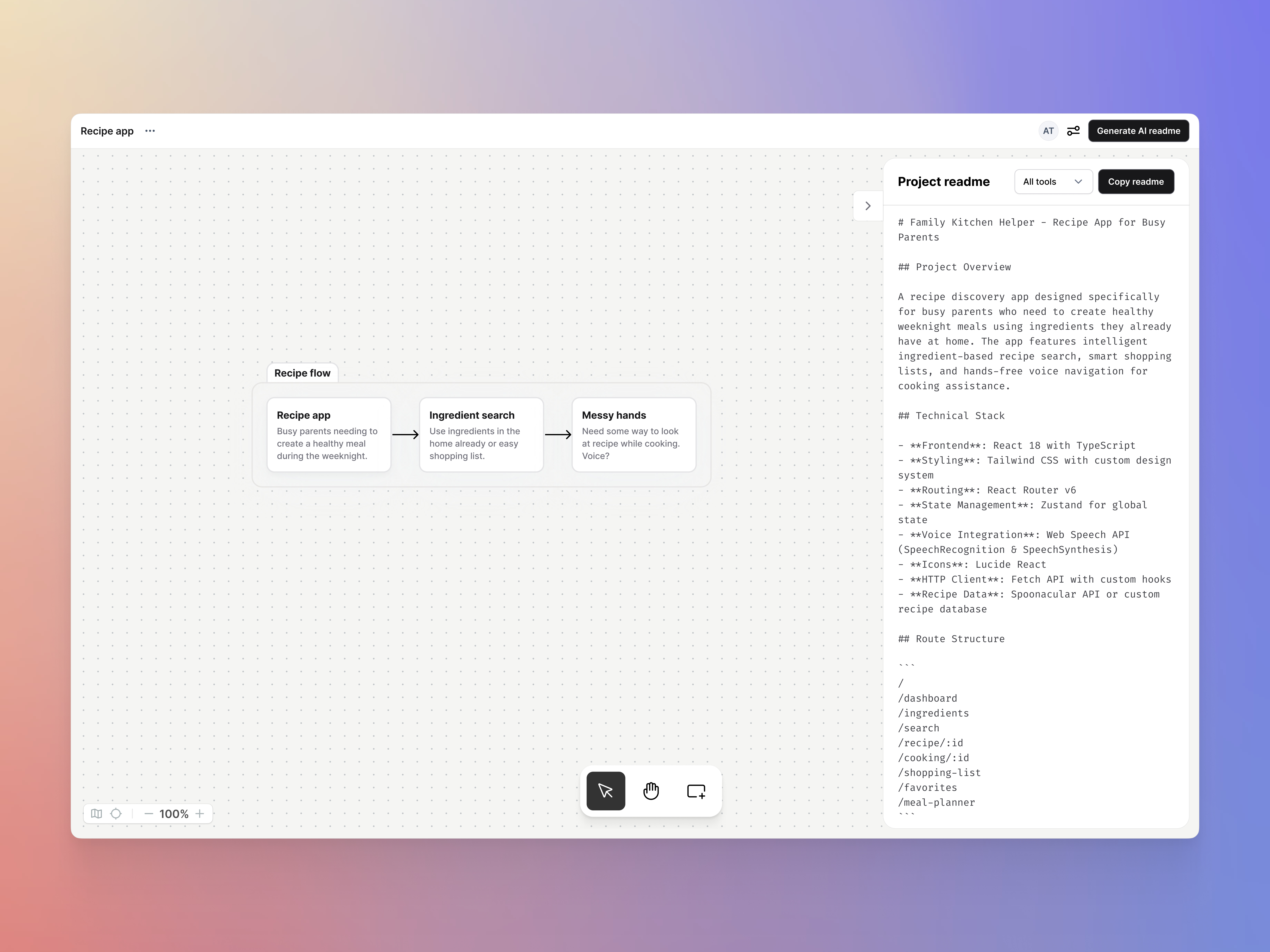
Or to make it easier, I built mkr.cards to make this whole experience visual. It's still early and I'm actively improving it (no mobile version yet), but it works. Just sketch your app idea in a spatial interface, hit generate readme, and import into your favorite coding tool.
This is how I've built:
Verbal: Moodboard generator. First time the method really clicked for me.
Conversee: 4 weeks, Bolt hackathon. It’s been so exciting to see real users practicing their Spanish.
mkr.cards: Meta proof—using the method to build the method tool.
Sibi: Feature updates like onboarding and HVAC sizing calculators built using this method.
From Chat to Canvas: The Spatial Shift
In my previous article on AI interfaces, I explored how interfaces can evolve from text commands to spatial navigation. Early computer games required typing "go north" to move. Modern games let you navigate worlds spatially. AI tools can and are making the same leap.
mkr.cards changes this. Like moving from command-line interfaces to visual desktops, it puts your entire product on a spatial canvas. Every feature, flow, and connection stays visible. The AI sees the whole picture, not just your last message.
This matters because products aren't linear. They're networks of interconnected features. When you map them spatially, you catch relationships that break when discovered sequentially. The visual becomes the spec.
Your README Template
# Project: [Name]

## Business Context
- Problem: [What's broken]
- Who: [Specific user with specific pain]
- Solution: [Your unique approach]
- Why Now: [Market timing]
- Success Metrics: [How you'll know it works]

## User Journey
[Visual flow: Entry → Key Action → Success]

## Technical Context
- Framework: [React, Next.js, etc.]
- Shadcn, tailwind, etc what do you want it to use?
- Design if you have it [Figma MCP links]
- Design System [MCP or define basics here]
- Constraints: [Performance, cost, security]

## Development Phases
Phase 1: Core Magic [Prove it]
Phase 2: Real Product [Polish it]
Phase 3: Scale Ready [Grow it]
Why This Works
AI coding tools are pattern matchers. If you give them:
Clear user journeys
Business context
Phased roadmap
Technical constraints
They build your app or feature like a teammate.
Without context, they guess. With context, they ship.
For Designers and PMs
You already know how to write briefs, map flows, and define outcomes. The README Method just structures your thinking into a format AI can use.
The blocker isn’t your technical skill. It’s your context.
Ship Something This Week
Next time, don’t start with a prompt. Spend 10 minutes sketching the flow. Write a one-page README. Then feed it to the AI.
I built a working language learning app in four weeks this way. Try Conversee to see what the method produces. Use mkr.cards if you want to visualize your planning (and give me feedback to! I’d love for you to try it).
Most importantly: Ship something! Tell me what you build.
Stop prompting. Start planning. The builders who understand this will ship products while others debug broken features.